 Photo Video Editor
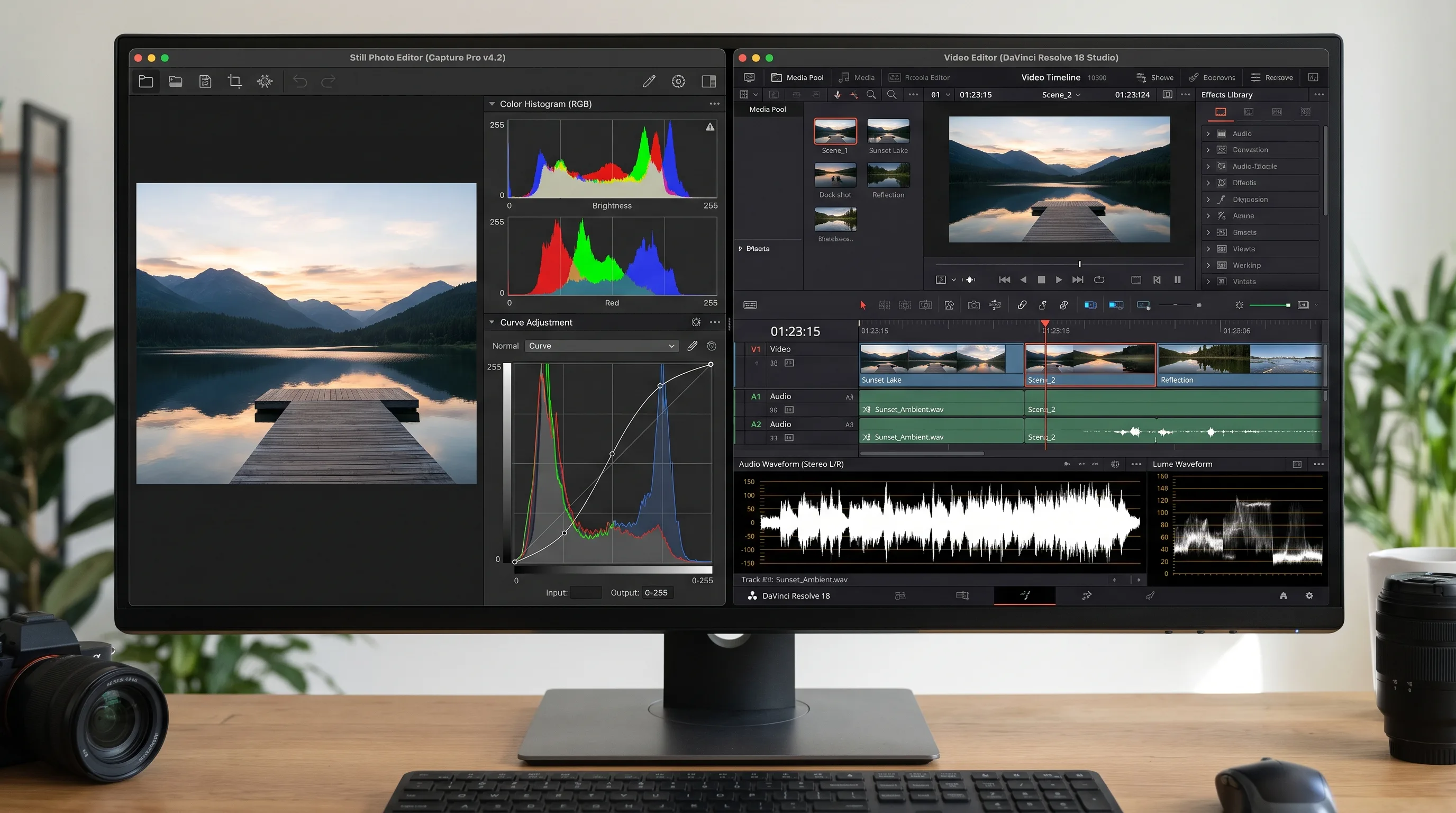
Why Are the Techniques Still So Divergent?
Open Photoshop or Lightroom, and you are working on a single frozen frame. Every slider, curve, and adjustment layer exists to balance light, texture, and color across a fixed two-dimensional coordinate space. Open a timeline in Premiere Pro, Final Cut, or DaVinci Resolve, and you are suddenly forced to think in four dimensions: horizontal width, vertical height, audio frequency, and forward progression across time.
Both disciplines deal with pixels, color science, and dynamic range, yet their foundational toolsets feel like they were engineered on entirely different planets. Photographers transitioning into motion frequently find themselves baffled by node trees, timeline playheads, ripple edits, and vector scopes. At the same time, seasoned video editors often struggle when faced with layer masks, frequency separation, and spatial composite design in a dedicated photo editor.
The divide is rooted in history. Still image processing evolved from darkroom chemical development, negative enlargers, dodging, and burning. Non-linear video editing software evolved from physical film splicing, tape-to-tape deck cutting, television broadcast control rooms, and analog audio mixing boards. Even though both mediums are completely digital in 2026, their practical physics remain fundamentally different.
Photo Editing Is Spatial, Video Editing Is Temporal
The single biggest reason editing techniques diverge comes down to spatial versus temporal constraints. When you work on a photograph, your viewer might inspect every edge, pore, and specular highlight for thirty seconds. Every single pixel in that 45-megapixel still has nowhere to hide.
In video editing, that same subject is moving at 24, 30, or 60 frames every single second. A single frame exists on the viewer's retina for barely 41 milliseconds. If a color shift or edge artifact lasts for two frames, the human eye barely registers it, but if a cut happens three frames too early or too late, the viewer feels an immediate subconscious jolt.
This reality splits how both mediums approach color, contrast, and composition:
- Spatial perfection: In photo editing, you paint micro-masks around stray hairs, run frequency separation across skin textures, and balance localized dodging and burning across a single visual plane.
- Temporal consistency: In video editing, localized adjustments must track accurately across hundreds of moving frames. An aggressive curve adjustment that looks breathtaking on frame 12 will fall apart on frame 36 when the subject turns toward practical ambient lighting.
- Rhythm and narrative momentum: A photo tells its complete story simultaneously across the whole composition. A video builds meaning through the relationship between consecutive shots, pacing, cut transitions, and anticipation.
Videos Need Audio, and Thus Take in All the Audio Tools
A photograph never makes a sound. You never have to worry about dialogue clarity, room tone, room reverberation, phase cancellation, or sub-bass rumble when retouching a landscape or product hero shot.
Video is an audio-visual medium where bad audio ruins exceptional visuals instantly. Half of the technical architecture in modern video suites is dedicated to digital signal processing for sound:
- Multi-track audio timelines with dedicated sub-mixes and bus routing.
- Dynamic equalization, surgical notch filtering, and noise suppression.
- Compressors, limiters, and sidechain ducking to dip background music under dialogue automatically.
- Precise synchronization between visual audio spikes and frame-level cut points.
For independent creators and solo freelancers, this turns video editing into a hybrid role. You aren't just an image retoucher. You are an audio engineer, a story editor, and a colorist all at once. If you need to quickly cut footage, combine music, and publish without fighting complex desktop installations, using a browser-based free online video editor keeps the focus squarely on narrative timing and clean delivery.
There's a Difference Between Editing and Compositing
Much of the confusion around editing techniques comes from blending two very different jobs: editorial cutting and visual compositing.
In the film and commercial world, video editing is the craft of selecting takes, setting pace, and assembling the sequence. Compositing, handled in programs like After Effects or Nuke, is the craft of combining multiple visual layers, motion tracking, roto-masking, keying green screens, and blending visual effects into a cohesive shot.
Compositing actually shares massive common ground with photo manipulation. Both rely heavily on blend modes, matte keys, alpha channels, and spatial transformations. However, compositing tools heavily discourage the loose, exploratory timeline slicing of narrative video editors. They demand structured node graphs or strict parent-child layer stacks because every single element must calculate its physical position across every tick of the clock.
Is There a Tool That Uses the Same Approach Used in Video Editing, to Photo Editing?
Photographers watching video colorists often notice tools that seem vastly superior for certain looks: node-based workflows, RGB parade monitors, vector scopes, and dedicated color wheels for lift, gamma, and gain. That naturally sparks the question: can you use that exact same video grading approach on still photography?
The short answer is yes. Several modern tools bridge that gap:
- DaVinci Resolve for Stills: You can drag high-resolution RAW stills (or converted DNG files) directly into DaVinci Resolve's timeline. This unlocks Resolve's legendary node tree, Color Space Transform plugins, custom LUT matrices, and precision wheel adjustments on a single photograph. You then export the graded frame as a high-bit TIFF or PNG.
- RawTherapee and Darktable: These open-source RAW processors use non-destructive pipeline modules that feed data sequentially from one mathematical operation to another, mimicking node trees far more than standard layer stacks.
- LUT-centric Photo Workflows: Mobile and desktop presets, including classic film looks from the photo editing VSCO era, rely on the same 3D lookup tables that video production houses use to map tonal values across clips.
Core Disciplinary Distinctions: A Side-by-Side Comparison
To see why workflows diverge so sharply across creative industries, let's look at how tasks, metrics, and software stacks line up across photo editing, video editing, photo manipulation, and graphic design.
| Workflow Dimension | Photo Editing | Video Editing | Photo Manipulation | Graphic Design |
|---|---|---|---|---|
| Primary Focus | Balancing exposure, color, and dynamic range on a single shot | Structuring temporal rhythm, narrative sequence, and sound | Fabricating altered or surreal visual composites from multiple assets | Arranging typography, shapes, and imagery for structured visual communication |
| Core Working Axis | Spatial (X, Y) | Temporal (X, Y, Time, Audio Tracks) | Multi-layered spatial depth (X, Y, Z depth mats) | Vector layout, visual hierarchy, and print boundaries |
| Standard Software | Lightroom, Capture One, browser photo apps | Premiere Pro, DaVinci Resolve, Final Cut | Photoshop, Affinity Photo | Illustrator, InDesign, vector graphics suites |
| Retouching Depth | Sub-pixel skin smoothing, localized dodging and burning | Global scene balancing, automated shot tracking, LUT application | Heavy edge extraction, light wrap painting, perspective distortion | Framing, asset positioning, vector styling, and cropping |
| Performance Bottleneck | Single-image RAM buffering and megapixel RAW decoding | Sequential disk read throughput, GPU decoder codecs, multi-core CPU rendering | Layer scratch disk space and complex smart filter recalculations | Vector rasterization and typography font management |
Understanding Key Industry Distinctions
When searching for creative software, terms frequently get mashed together. Understanding the clear lines between these disciplines saves hours of wasted effort and bad tool choices.
Photo Editing vs Video Editing
Photo editing is an exercise in extraction and polish. You take a captured scene and draw out shadow detail, tame harsh highlights, balance skin tones, and correct optical lens distortion. Video editing is an exercise in construction. You cut down hundreds of individual camera angles, discard ninety percent of the captured footage, build narrative pacing through juxtaposition, and marry the visuals to an acoustic soundtrack.
Photo Editing vs Photo Manipulation
Standard photo editing respects the integrity of the scene as captured. You are adjusting tonal curves, cleaning sensor spots, or adjusting white balance. In contrast, photo manipulation alters reality. It involves cutting subjects out of one scene, replacing skies, warping anatomy, painting synthetic reflections, and stitching elements from five disparate stock photos into a seamless fantasy illustration.
Photo Editing vs Graphic Design
Photo editors produce polished photography. Graphic designers use those photos as raw ingredients alongside vector logos, brand colors, typographic hierarchy, grids, and call-to-action banners. A photo editor finishes an image; a graphic designer turns that image into a billboard, social media carousel, or book cover.
Photo Editor vs Photoshop
Beginners often ask whether they need a full Photoshop license or a streamlined photo editor. Dedicated photo editors (whether Lightroom, mobile grading apps, or quick browser platforms) focus purely on global color, tone curves, cropping, and rapid batch exports. Photoshop is a massive raster graphics engine designed for complex layered compositing, digital painting, 3D texturing, and detailed prepress proofing. If your job is color correction and framing, a dedicated photo editing guide will show you that Photoshop's multi-gigabyte footprint is often far heavier than what the task actually demands.
Metadata, Backgrounds, and Delivery in 2026
Both photo and video workflows have evolved alongside modern web standards. Two practical tasks illustrate how specialized editing tasks have become:
Photo Editing and Background Change
Historically, isolating a product or portrait subject required hours of meticulous pen tool pathing. Today, modern workflows handle this via edge-detection algorithms right in your browser. Using a dedicated free online background remover lets you strip backgrounds cleanly to transparent PNGs without opening heavy desktop suites, creating clean assets for e-commerce, thumbnail creation, and social banners instantly.
Photo Editing Date and EXIF Management
In photographic archives, managing temporal data happens through EXIF tags rather than video timelines. A dedicated photo date taken editor or metadata manager modifies the internal camera timestamp without re-compressing the image. In video, that temporal data is hard-baked into timecode tracks, frame rates, and drop-frame counters, reflecting the strict synchronization required by broadcast systems.
The Convergence of Modern Creative Workflows
While the internal physics of photo and video editing remain distinct, creative demands are pulling them closer together. Solo content creators, e-commerce sellers, and social media managers rarely have the luxury of working exclusively in one medium. You need to capture a product shot, grade it, isolate the silhouette, cut a punchy 9:16 vertical reel from the b-roll, and export clean graphics, all within the same afternoon.
The solution isn't to force photo tools to act like video software, or video timelines to mimic photo canvases. It's choosing lightweight, friction-free browser tools that respect both disciplines, letting you grade images, trim clips, and generate clean visual assets without software installs, watermarks, or account lockouts.
Frequently Asked Questions
How photo editing works for beginners?
Photo editing adjusts lighting, white balance, contrast, and framing on a single static canvas. You import a RAW or raster file, balance exposure and shadow recovery, apply color grading or curves, clean minor dust spots, and export to formats like JPEG, PNG, or SVG without worrying about sequential timing or audio.
How photo editing in Photoshop differs from standard editors?
Photo editing in Photoshop relies on non-destructive pixel adjustments through adjustment layers, layer masks, and smart filters. Rather than applying a single global grade, Photoshop allows deep retouching, frequency separation, and complex composite work on individual raster elements.
How photo editing app workflows operate on mobile or web?
A photo editing app processes edits directly on mobile hardware or inside a browser canvas. Modern lightweight web apps handle tone mapping, cropping, and instant filters locally without requiring heavy desktop installations or server uploads, letting you export finished assets in seconds.
How photo editing in AI changes traditional workflows?
Photo editing in AI automates tedious manual processes like subject masking, background removal, skin cleanup, and lighting relighting. Instead of manually painting layer masks, neural models identify edges and textures automatically, though fine manual grading is still used for creative control.
What photo editing apps are free for daily use?
Several apps offer free tiers or completely free interfaces. Options include browser-based editors that let you crop, balance tone, and export without watermarks, alongside mobile favorites like VSCO and Snapseed that offer core color and exposure adjustments at zero cost.
What photo editing software is free on desktop?
Free desktop photo editing software includes open-source tools like GIMP and RawTherapee, browser-based alternatives like Photopea and modern web photo editors, and professional post-production suites like DaVinci Resolve, which can import and grade still RAW images using node trees.
Everything in this article works in the browser editor. No watermark, no account.