 Photo Video Editor
A template can save ten minutes, but a watermark, forced sign-up, or blocked export can waste the next thirty. CapCut photo editing templates are popular because they turn a folder of images into a social-ready visual quickly. They also work best when you know what the template changes, what you still need to edit, and where the final file will be used.
This guide covers the CapCut template collection and the practical workflow around it. It also gives you a browser-based alternative for making photos, videos, logos, business cards, flyers, reels, shorts, stories, covers, and thumbnails without installing an app.
Hot Templates
The source collection groups popular CapCut photo editing and photo-video formats under names such as CapCut Trending Video, CapCut Professional Template, Best Templates, Slow Motion Template CapCut, CapCut Love Template, CapCut Reel Template, New Trending CapCut Template, CapCut One-Click Template, CapCut Simple Template, CapCut Original Template, CapCut Dance 2, CapCut Cross-Platform Template, CapCut Copyright-Free Template, CapCut Fast Editing Template, CapCut Unique Template, CapCut New Version Free Template, CapCut 2 Photos Glitch Effect, CapCut Latest Trend Template Download, New Free 2026 CapCut Templates, CapCut For Girls, CapCut 2 Video Template, Top Charts, Silhouette, CapCut You And Me, CapCut Song Template, and Gimme More Edit.
Template names and popularity figures can change as the collection updates. The practical difference between them is usually the number of media slots, the timing of transitions, the music or sound design, the text treatment, and the intended format.
Popular photo editing templates in the collection
The featured list includes formats such as Ber4 Mengcollab, Cinta Karena mu, Ha, Trend Giang Hồ, transisi photo, Hubbuka Fi Qalbi, UNTUK SELAMANYA, Trend Edit New, Foto Couple, frame estetik, thecollab, cowok vs cewek, and frame aesthetic. The visible collection showed figures ranging from thousands of uses to millions, including 5.6M for the top displayed item and 2.7M for Ber4 Mengcollab. Those figures are snapshots, not permanent rankings.
How to choose a template without losing your style
- Match the format. Use a vertical template for a reel, short, or story. Choose a landscape layout for a video tutorial or website visual.
- Count the media slots. A template with two slots will not suit a ten-image recap unless you duplicate or replace scenes.
- Check the text. Replace generic wording, correct names and dates, and keep important text away from the edges.
- Review the audio rights. A template's sound may be appropriate for one platform but restricted on another.
- Protect the subject. Fast zooms, flashes, and face effects can obscure a product or make a portrait look unnatural.
About CapCut photo editing
The CapCut photo editing collection is presented as an Editor's Pick selection of customizable designs. Its central idea is simple: choose a template, replace the supplied photos or clips, adjust the text and visual treatment, then export a finished social visual. The collection is aimed at social posts, personal memories, creator content, and quick promotional edits.
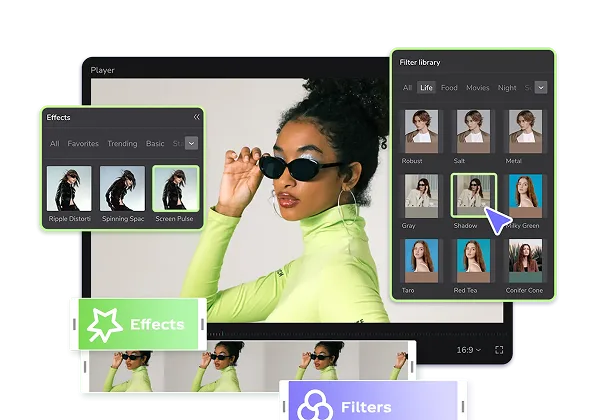
Typical controls in this type of photo editing workflow include drag-and-drop media placement, filters, effects, text, transitions, image enhancement, and platform-oriented exports. A template can speed up the first draft, but you still need to check cropping, skin tones, readability, timing, and compression before publishing.
Photo editing CapCut templates versus a general photo editor
CapCut is a useful reference point when your output is a short, animated social post or a photo video. A general photo editor is more flexible when you need a clean still image, a logo, a flyer, a business card, or a transparent asset. For those tasks, you can use Photo Video Editor directly in your browser.
| Need | Template-first workflow | Editor-first workflow |
|---|---|---|
| Fast trend-based reel | Start from a preset rhythm, transition, and text style | Build the timing and layout manually |
| Product image | Replace a media slot and adjust the crop | Clean the image, remove the background, and create a controlled composition |
| Logo or business card | May require adapting a visual template | Use text, shapes, alignment, and vector export for a more reusable design |
| Brand consistency | Replace fonts, colors, and wording if the template allows it | Set the same visual system from the first element onward |
| Privacy-sensitive files | Check the service's upload and storage model | Photo Video Editor says files edited in its browser editor do not leave your device |
Photo editing online without an account
If you only need to crop, adjust, combine, or export a visual, account creation can add friction without helping the actual edit. Photo Video Editor runs in the browser, requires no installation and no account, and adds no watermark to exports. The files you edit are not uploaded to use the editor. You can make social posts, covers, thumbnails, reels, shorts, stories, logos, business cards, flyers, and posters in one tab.
Its free workflow includes photo editing, video editing, free MP4 export, and free SVG export where applicable. SVG export is useful when you need a vector logo or design file that can be resized without the same quality loss as a raster image.
AI tools and pricing clarity
AI can help with product shots, professional headshots, logo concepts, social visuals, ad creatives, posters, and photo fixes. These are optional tools, not a requirement for ordinary editing. They use paid credits, and the price is shown before you run the tool. That gives you a chance to review the cost before spending credits rather than discovering a charge after processing.
Background removal includes a free SD cutout. HD output is available through credits or Pro. Inspect generated product labels, facial details, fingers, shadows, and fine edges before using an AI result in an ad or listing.
What the main tools are for
- Photo editor: Crop, arrange, adjust, and export still images for social or business use.
- Video editor: Assemble clips, photos, text, audio, and transitions into an editable video.
- Logo maker: Build a simple brand mark and export a vector design as SVG where supported.
- Business cards: Set up names, roles, branding, and contact details in a print-oriented layout.
- Flyers and posters: Combine headline text, images, shapes, and calls to action in a single design.
- AI product shots: Generate a studio-style product image from one product photo.
- AI headshots: Generate portrait variations from a selfie.
- Photo fix: Apply one-tap professional polish to an image.
How to use a photo editing template
- Choose the final destination. Decide whether the asset is for a feed post, story, reel, short, thumbnail, print flyer, or website.
- Prepare your media. Select sharp images, remove near-duplicates, and put the strongest image first.
- Pick a template that fits. Look for the right aspect ratio, number of slots, pacing, and visual mood.
- Replace the sample content. Add your own photos or clips and check every crop instead of assuming the automatic framing is right.
- Edit the message. Rewrite the headline, correct spelling, add a clear call to action, and keep the key words readable on a small screen.
- Check brand details. Use consistent colors, fonts, logo placement, and product names.
- Preview at full speed. Watch the complete photo editing video or still design before export. Look for flashes, clipped text, bad transitions, and sudden volume changes.
- Export a copy. Keep the original project editable, then export the file needed by the platform.
Using Photo Video Editor from start to finish
Open the browser editor and choose Photo editor, Video editor, Logo maker, Business cards, Flyers & posters, AI product shots, AI headshots, or Photo fix. Add your local media, make the changes, and export the result. The editor is designed for local browser work, so your source files stay on your device while you edit.
For a broader collection of layouts, see these free photo templates. If your project is a reel or short rather than a still image, the free reel creator guide can help you choose a structure before you start cutting clips.
Photo video editing for creators and small businesses
A photo editing video often performs better when each image has a job. Use the first frame to establish the subject, the middle frames to show proof or variation, and the final frame to give the viewer one clear next step. For an online shop, that might mean product detail, use case, close-up, and offer. For a personal recap, it could mean place, people, moment, and ending.
Templates help with pacing, but they cannot decide whether the product is visible, the offer is accurate, or the message makes sense. Those checks still belong to you.
When a template is the wrong choice
- The design hides a key product feature.
- The music or effects conflict with your brand.
- The template uses more photos than you have.
- The text is too small for mobile viewing.
- The export includes a watermark or reduces quality below your requirement.
- The template looks similar to many competing posts and makes your content less recognizable.
In those cases, start with a blank project. A simple layout with one strong image, readable type, and controlled spacing is often easier to trust than an overloaded trend edit.
Best photo editing app and software choices
There is not one best photo editing app for every task. A mobile app is convenient when you shoot on your phone. A desktop editor is better for detailed retouching, layers, and large files. A browser editor is useful when you want to work quickly on a Chromebook, shared computer, or machine where you cannot install software.
| Use case | What to prioritize | Practical choice |
|---|---|---|
| Quick social graphic | Templates, text controls, correct dimensions, fast export | A browser photo editor or template-based app |
| Detailed retouching | Layers, masks, selections, color controls | Dedicated desktop photo editing software |
| Reels and shorts | Timeline, transitions, audio, captions, MP4 export | A video editor with photo and clip support |
| Logo design | Shapes, alignment, typography, SVG export | A vector-capable editor |
| Private local editing | No upload requirement, no account, local file handling | A browser editor that keeps files on the device |
For a more detailed look at selection criteria, read the guide to best photo editing software. For browser video work, you can also use the free online video editor without watermarks.
FAQ
How photo editing?
Start with the crop and composition, then correct brightness, contrast, color, and distracting details. Add text or effects only when they support the image. Export a copy in the size and format required by the destination.
How photo editing in Photoshop?
Open the image, duplicate the background layer, crop and straighten it, make non-destructive light and color adjustments, retouch on separate layers, and export a copy. Use masks when you need to limit an adjustment to part of the image.
How photo editing app?
Open the app, import a photo, crop it, adjust light and color, apply effects carefully, add any required text or graphics, preview it at its final size, and export. For a no-install workflow, use a browser-based editor.
How photo editing in AI?
Describe the intended result or select an AI action such as product-shot generation, headshot creation, photo fixing, enhancement, or background removal. Review the output manually. AI can alter faces, hands, logos, labels, and product proportions.
What photo editing apps are free?
Free apps include browser, mobile, and desktop options, but the word free can hide watermarks, account gates, export limits, ads, or paid AI features. Check those conditions before committing to a workflow. Photo Video Editor's photo and video editors are free, require no account, and export without a watermark.
What photo editing software is free?
Free photo editing software ranges from simple browser tools to advanced desktop programs. Choose based on whether you need templates, layers, vector files, video, privacy, or speed. Photo Video Editor works online in a browser, while its free Vanity Studio CLI works on Windows, macOS, and Linux.
Is Photo Video Editor a good photo editing app for Android?
It is a browser-based editor, so you can open it from a compatible mobile browser instead of installing a dedicated app. If you need a larger canvas, more precise text placement, or longer video timelines, a desktop browser is usually more comfortable.
What is the best photo editing AI for product images?
The right tool depends on the source photo, the style you need, and how accurately it must preserve the product. Photo Video Editor offers optional AI product shots, but you should inspect the generated result and confirm the price shown before running the tool. Do not publish an AI product image without checking labels, proportions, colors, and accessories.
Can I make videos from photos?
Yes. Add photos to a video project, set their order and duration, apply transitions, add text or audio, preview the timing, and export as MP4. For a faster automated workflow, Vanity Studio is a free CLI for Windows, macOS, and Linux. It can turn a plain-language request, a product page, or local media into an editable MP4 through a headless browser on your machine. It needs Google Chrome or Microsoft Edge. Voice-over and AI clips require your own provider API keys.
Are AI tools included in the free editor?
Basic photo and video editing is free. Optional AI tools use paid credits, and their price is displayed before you run them. Background removal includes a free SD cutout, while HD is available through credits or Pro.
Can I edit without uploading my photos?
Photo Video Editor says files edited in its browser editor never leave your device. That makes it suitable for local editing when you do not want to upload source photos just to crop, arrange, or export them.
Everything in this article works in the browser editor. No watermark, no account.