 Photo Video Editor
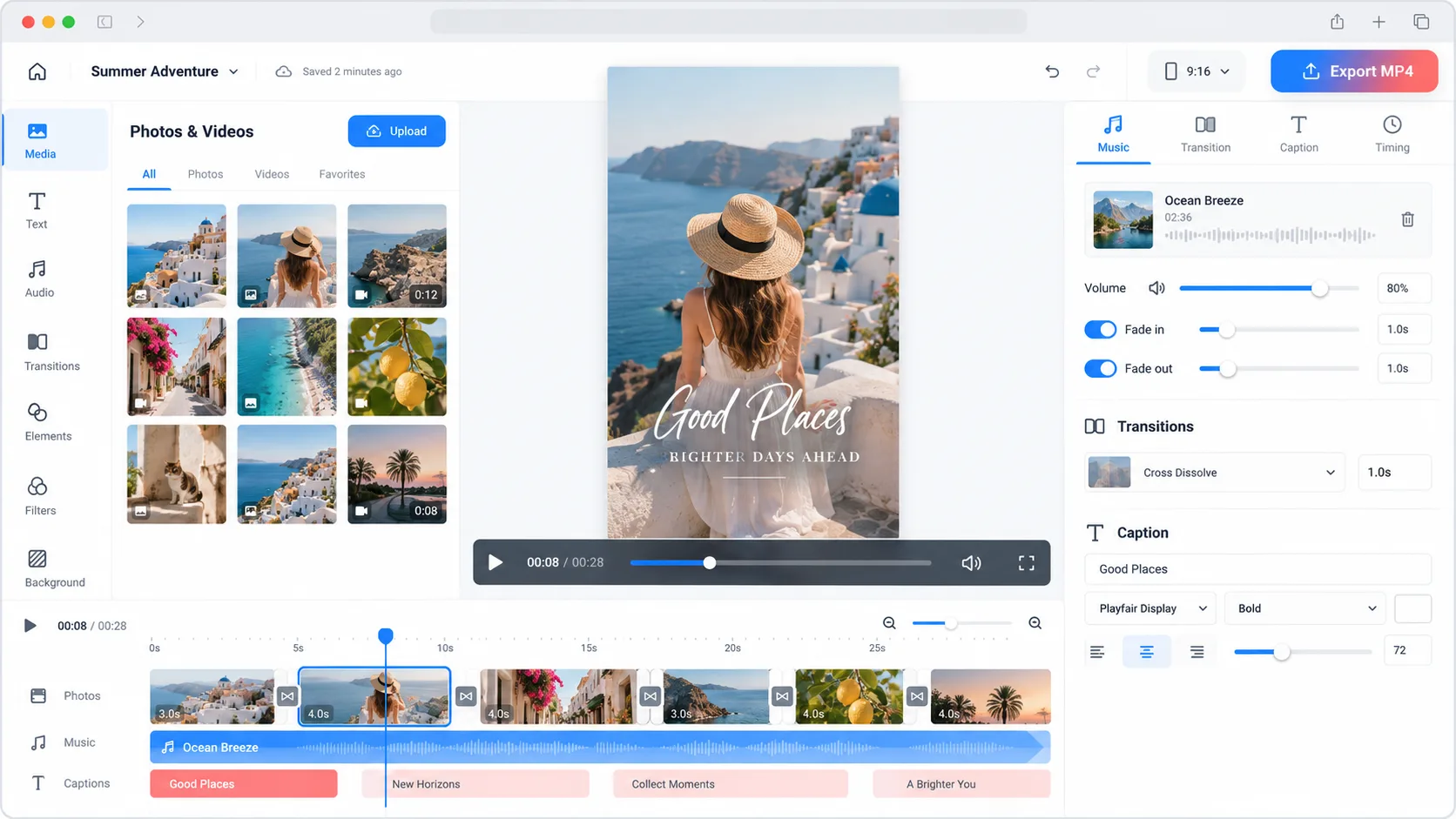
Create videos from photos for any platform
Turn photos into polished videos, slideshows, reels, stories, product demos, ads, and social posts directly in your browser. Photo Video Editor requires no installation or account for the core editor, keeps files on your device while you work, and exports without a watermark.
Choose the format that matches your destination: vertical for Instagram Reels, TikTok, YouTube Shorts, and Stories; landscape for YouTube, tutorials, presentations, and product demos; or square for social feeds and announcements.
Add music, transitions, effects, and captions
Upload your photos, arrange them in sequence, and set the duration of each scene. Give important images more time on screen, use simple fades or cuts between scenes, and keep captions short enough to read on a phone. Add music, shapes, graphics, logos, stickers, overlays, and light animation when they support the message.
Check the opening and final seconds carefully. The first frame should communicate the subject without sound, while the final frame should leave enough time for a call to action, URL, or product detail.
How to make a photo video
- Open the browser editor and choose a vertical, square, or landscape canvas.
- Upload your photos and arrange them in a deliberate sequence.
- Set the timing and crop each image so faces, products, and text stay visible.
- Add captions, music, transitions, branding, and subtle motion.
- Preview the complete video with sound and muted to check pacing, spelling, and clarity.
- Export the finished project as an MP4.
Use AI tools when they help
Optional AI features can support product shots, headshots, logo concepts, social visuals, ads, posters, and photo fixes. Use specific prompts that describe the subject, setting, lighting, composition, and output format. Review AI results for incorrect text, faces, hands, product details, shadows, and brand elements. Paid AI actions use credits, with the price shown before execution; background removal includes a free SD cutout, while HD output may require credits or Pro.
Edit photos and videos anywhere
A browser editor is useful on laptops, Chromebooks, and phones when you want to avoid installing a large desktop application. The same workflow can support photos, videos, covers, thumbnails, stories, reels, logos, business cards, flyers, and posters. Common image formats include JPG, JPEG, PNG, and supported SVG files. MP4 is a practical final format for most social videos, tutorials, ads, and product demos.
Photo video ideas
- Product launch: Show the product in context, follow with detail shots, and finish with the product name and next step.
- Before and after: Use matching angles and clear labels so the change is easy to understand.
- Travel or event recap: Group images by location or moment and add a short title card.
- Educational video: Give each idea its own frame with large, readable text.
- Small-business promotion: Start with the offer, show the product or service, and finish with a clear action.
Tips for a good photo video
- Choose one audience and message before importing files.
- Use the final platform's aspect ratio from the beginning.
- Place the strongest image or clearest promise first.
- Keep text high-contrast and readable on a phone.
- Use consistent crops, colours, and transition styles.
- Keep music below speech and review the muted version.
- Export a test copy and watch it on the device your audience uses.
Photo Video Editor's core photo and video editors are free to use, require no account, and add no watermark to exports. Check music, image, font, clip, and logo licensing before publishing commercial work.
Everything in this article works in the browser editor. No watermark, no account.